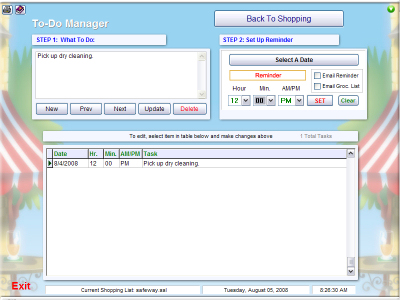
The ToDo Manager
helps you keep track of things you need to do.
To create a new task, click "New" and follow the red
blinking text. First, enter something to do in Step 1. Then click "Select a
Date" in Step 2 to choose the date the task needs to be done. Then, use the
dropdown boxes to select the time of day.
Just click "Set", and the Reminder box will
begin to blink. When the chosen time arrives, a bell dings and a reminder box
will pop up.
You can also
optionally check the "Email Reminder" and/or the "Email Groc. List" checkboxes.
When you do this, a box will slide out where you can put an email address to
send the lists to. The default address you entered into Preferences
will display. You can use this address, or enter a new one. When the time
arrives, the checked lists will be sent using the email info you set
in Preferences.
All tasks in the database are displayed in the bottom
panel. You can re-use any of these tasks just by selecting it in this panel, and
changing the date and time if needed.
This was never intended to be a full featured todo
manager, but it comes in handy during a busy day. Utilizing it with the new
email cellphone technology, it can save the day sometimes.
NOTE: Speedo Shopper must be running
and you must be connected to the Internet for the emailing feature to
work.
 Speedo Shopper